Skip to content

Argh, more than 2TB disk causes problems?

Here’s the tech scenario: I now have seven active Seagate Barracuda SATA2 500GB drives in a RAID5 array, using a Highpoint RocketRAID 2320 card. This setup gives a total capacity of 3TB and can survive one drive completely dying.

Under Windows, drives are formatted with a Master Boot Record partition map. This format imposes a 2TB limitation on allocatable space within a volume. I was unaware of this limit when I set up the RAID card, and am now paying the price.

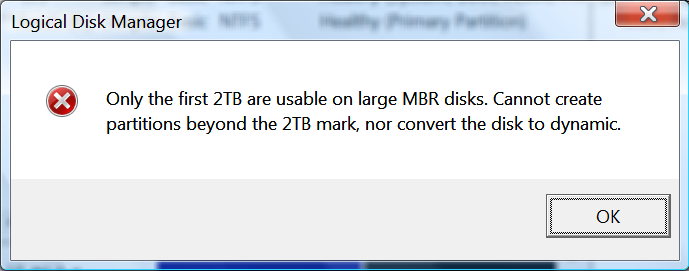
The problem is that now, I have 750GB of unallocatable space on my RAID volume. I can’t extend the existing partition or even create a new one, with a wonderfully incomprehensible error message leading the way.
Supposedly, this problem can be fixed by using a GUID Partition Table (GPT) setup. Unfortunately, GPT conversion requires an empty volume – and I have 2TB of data that can’t really be moved anywhere else.

Anyone know of a utility (open source, freeware, paid) to convert MBR to GPT? I’ve actually read the GPT specification and it doesn’t seem too difficult to implement, but I really don’t want to get into hex editing the raw disk for various reasons.

{ 4 } Comments

  1. Neil Feiereisel | July 22, 2008 at 10:22 am | Permalink

    I have used HighPoint RocketRAID cards with large capacity drives (12 x 1 TB = 12 TB in RAID 0), and had no problems with Windows XP as long as you increase the sector size in the HighPoint RAID config utility. 512 byte sectors will get you 2 TB max. 1k will give you 4 TB, etc. This is due to a limitation in Windows for the number of bits they use to represent the size of a partition. By increasing the sector size, you effectively get a larger partition with the same number of bits. I was doing this with an extra drive that is separate from the OS drive.

    We’re using the newest 16-port HW RAID card (they just released it).

    Good luck,
    Neil

  2. Jake Billo | July 23, 2008 at 12:31 am | Permalink

    Thanks Neil! If you’re still following this, can you point me to exactly where in the HighPoint utility one would go to change the sector size? The documentation is a bit sparse on this point.

  3. Jake Billo | July 23, 2008 at 12:50 am | Permalink

    Ah, wait, you probably mean the BIOS-based utility and not the Windows admin UI? After reading some documentation, it looks like I might have to update the card to take advantage of it.

    Not a problem; I’ll just have to do it tomorrow afternoon when I can reboot the box and find the hptflash utility.

  4. Airbair | December 27, 2009 at 12:18 pm | Permalink

    hi,

    I’m looking into making a server with 4×1.5TB in raid5 on the raidcontroller you are using.
    A friend of my also has a raid5 with 4×1.5TB with his onboard raidcontroller. But his writespeeds suck pretty hard. His read is very nice, about 500MB/s, but his write is like 50MB/s.
    Now I was wondering what your writespeed is of the raidvolumes since you have the non-onboard raidcontroller in use?

Post a Comment

Your email is never published nor shared. Required fields are marked *