Skip to content

Playing x264/H.264/MKV on the Xbox 360

Update 03-30-2008: If you follow this tutorial and find that GOTsent isn’t for you, please check out XenonMKV, a custom utility I’ve written to replace this process. I highly suggest you check it out! Questions and concerns can be posted on the XenonMKV Forum. I’ve also stopped mirroring any new custom GOTsent packages.


With the release of the Xbox 360 ‘Fall’ Update, MPEG-4 ASP support (commonly known as DivX or XviD support) has been added to the integrated video player.
 

ilmlivebladefall2007.jpg

The primary missing feature is the ability to play high-definition H.264/x264 MKV streams. While H264 support was added in the previous Dashboard upgrade, unfortunately, the decoding implementation isn’t perfect: the dashboard doesn’t natively read MKV. As well, high definition files can only contain a 2-channel AAC soundtrack, not full 5.1+ surround. This prevents using the Xbox 360 for most H264 content available on the Internet.

There is still a way to view HD content (with 2 channel sound) on the Xbox 360: transcoding the audio track and repackaging the MKV file into a MP4 container. This process takes significantly less time than converting both video and audio, and the visual quality is maintained. You do lose the additional 3.1 channels, but it’s better than having to install a Core 2 Duo E6750 under your TV just to play these files.

For a while, AAC recoding has been somewhat of an arcane art, known only to those who’ve spent years looking on the Doom9 forums. I’d looked into this a few months ago and wasn’t too impressed with the available solutions. Skimming the Xbox 360 information thread from the Something Awful forums today, though, I found a solution that should work for people prepared to install a few free utilities.

Getting Set Up for Encoding
You’ll need a few free utilities to get your system in the best shape possible for repackaging the MKV contents into an MP4 container. Here’s the sequence I followed on a fresh XP installation:

  • Download and install the newest version of CCCP, which includes a stable version of ffdshow and Haali Media Splitter. A new edition was released on January 24, 2008 so I’d advise an upgrade if you’re running something older.
  • Download and install AC3Filter, which is a good utility to have anyway if you’re planning on listening to 5.1 audio or outputting optical/coaxial audio from your sound card.
  • Download a copy of Nero AAC Encoder and extract the contents of the win32 folder where you can find them later. If you use the package I provide below, the files are already included.

The Magical Tool of Whimsy
The tool that makes Xbox playback possible is called GOTSent, which boasts “easy and fast x264 .MKV to PS3 and XBOX 360 compatible MP4 and PS3 compatible VOB/AC3 conversion.” It’s essentially a wrapper around several open source video encoding utilities, but it certainly does the job as intended. The current version is 0.23B10, which has been mostly stable in my experience. Make sure you’ve already downloaded and installed Nero AAC Encoder, CCCP and AC3Filter before grabbing this file.

Before You Begin: AC3Filter Gain Level
In my experience, the AAC audio in the newly muxed file is at a significantly lower level than most non-HD sources, so you may have to increase your volume to properly watch the videos on the Xbox 360. The more permanent way to solve this issue, though, is adjusting the gain control in AC3Filter. These instructions assume you’ve installed the newest CCCP and AC3Filter already.

  • Start the original H.264 video file that you’d like to convert in Windows Media Player, Media Player Classic, Zoom Player, or any other player that uses DirectShow media filters. (Most players except VLC fall into this category.)
  • In your system tray, right-click the red FFDshow icon – highlighted in yellow in the following image. Select AC3Filter from the popup menu.

    ffdshow tray icon
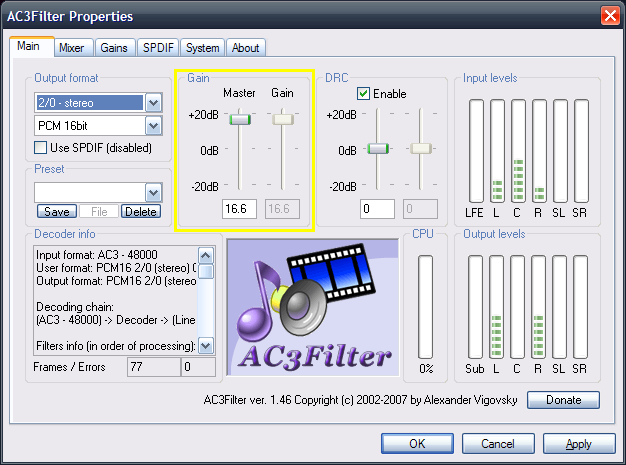
  • In the AC3Filter dialog, slide the Gain slider up until the sound from the original video file matches your normal system sound or MP3 volume. Try seeking to a loud section of the video to get a good idea of where this setting should be. I needed a fairly hefty boost on my system (which has onboard Intel HD-compatible sound to standard stereo out, on an Asus P5B Deluxe motherboard) of about +16.6dB to match standard iTunes output, but going any higher resulted in clipping and distorted sound.AC3Filter Gain ControlAs you adjust the slider, you should immediately hear the difference in the video file. Ideally, make this setting as close to 0dB as you can tolerate to avoid distortion. Looking at the input levels equalizer may also help in determining the right setting.

    Once you’ve selected your gain level, click OK and close the current video file.

GOTSent Tips and Tricks
You’ll definitely need to use the “Split >4GB option” so that the Xbox recognizes the output files, and try converting one file at a time to get a general idea of how the process works. I’ve been able to avoid using the MPEG2 Recode, Safe Sync, Mux to Vob (PS3) and 25 FPS options, so leaving them unchecked should work.

Once the GOTSent process is done, rename the output file to Filename.avi – while the Xbox 360 should detect the original .mp4 extension from Zune or Windows Media Player 11 sharing, Windows Home Server standard media sharing requires .avi extensions for the files to be properly seen. Add the faux-AVI files to your video library as usual, and you should be up and running watching HD content from your Xbox 360.

Caveats and Setbacks
Not all files I’ve found will work with GOTSent, but it’s certainly got a high level of compatibility with exotic downloads. For example, certain x264 HDTV files simply cause GOTSent to chew up CPU and refuse to enter the demuxing phase of the job. You can tell if this is the case, because a command prompt window appears in the tray during the first step GOTSent takes.

It appears as if all the tools included with GOTSent are single-threaded and Win32 binaries; for those of you with high end 64-bit systems intending on taking advantage of extra CPU cores, there’s not too much optimization coming your way with the utility. You’ll still be able to perform normal computing tasks while the program works, though, so not all is lost.

I’m looking forward to any new updates and fixes for this program, and will keep you informed as to any developments I’m aware of. sentry23 (the original author) has done a great service releasing this tool and it’s certainly sped up the process of converting files for me.


{ 70 } Comments

  1. Professor Grum | February 5, 2008 at 7:14 am | Permalink

    nice wokr on this, this is exactly what ive been looking for,

    Now i can play all those illegally Hi def Blu-Ray/HD rips movies downloaded from bittorrent or from yastorage/adrive/other upload sites posted http://www.rlslog.net/ that get put into the x264 mkv format. :)

  2. Jake Billo | February 5, 2008 at 1:14 pm | Permalink

    Hey, nobody said anything about illegal MKV rips. :) This is just a conversion guide.

  3. God | February 20, 2008 at 11:05 pm | Permalink

    After going through many time consuming articles and forum threads, i find that this is probably the easiest way to convert a x264 mkv file into a mp4 playable on both the xbox 360 and ps3

    definately try this way before doing anything else.

  4. Houmi | February 21, 2008 at 2:53 pm | Permalink

    Very nice doc. Thank you.

    By the way you do not need to split the files into 4G, if you format your
    USB drive (to be used with Xbox 360) via MacDrive w/ the HFS file system
    format. But yes, if you do use FAT32 you need to split video files.

  5. Jake Billo | February 21, 2008 at 3:16 pm | Permalink

    The 4G restriction also applies from NTFS drives over Windows Media Connect. The box simply refuses to play the files, and with >1.1TB of videos an external drive’s really not an option for me. :) You also can’t connect an NTFS drive directly to the box, so that option’s out. :(

    Thanks for the pointer though!

  6. Gotsent rocks | February 21, 2008 at 11:42 pm | Permalink

    Yes. the xbox 360 can’t read any h264 file over 4gb and/or has 5.1 aac. Two features i hope they add

  7. Houmi | February 22, 2008 at 2:43 am | Permalink

    Wait a minute, so MP4’s have to be 4G or less ? Because I do have 7-8Gs
    for my WMV’s… just about to use this guide to convert couple of mkv’s
    I have.

  8. Roo | February 22, 2008 at 2:58 am | Permalink

    i did everything exactly as posted here but unfortunately it didn’t work….all GOTsent did was to split my 4.32GB file into 2 files of 198 MB combined. so i have no idea what happened…..i am retrying to convert the .mkv file without splitting and see if it works. i have read comments here saying that it wont work if the file is over 4GB but i am gonna try anyways since the first option didn’t work….i’ll briefly state below what i did and what the outcome was if you guys can spot an error.
    i selected the file i wanted to convert in GOT….selected my output folder….the only box that was marked for split>4gb….i started the converting and after 30 or mins it created two mp4 files….one was 101MB and other was 97MB. i tried playing them using media player, VLC and others but only the sound worked and the video files were somehow totally gone which is what i expected with 198MB. so got any solutions?
    i use vista, trying to play my first downloaded HD dvd on my tv using media center and xbox 360.
    alright as i was writing this….my second attempt was a failure as well. this time the split?4gb was unchecked and the same outcome….this time one file of 198MB instead of 2. playing only the audio.

  9. Jake Billo | February 22, 2008 at 10:38 am | Permalink

    Houmi: In my experience, anything with a filesize above 4GB won’t work as intended. I’ve tried this on two separate files and both came up with the same result – inability to play the file simply based on filesize. It seems to be another restriction on Microsoft’s part.

    Keep in mind that my testing was done through Windows Home Server and its built-in version of Media Connect; using the media sharing in WMP11 (which has never really worked as intended for me) may give better results. I’ll run a conversion this afternoon and perhaps post a clarifier if I can get decent results.

    Roo: That’s unfortunate to hear. It sounds like the original MKV file has a bad frame or segment that’s preventing GOTsent from encoding the video material correctly. If you’d like, feel free to email me the filename or release name that you’re trying to convert, and I can check things out from my end. It may be that the original release has been nuked, which can sometimes happen if you’re using BitTorrent or other similar means to get these files.

  10. Houmi | February 22, 2008 at 11:19 am | Permalink

    Jake,

    I did convert a mkv to mp4 (4.25g), I left it intact (did not split it),
    it plays fine on my PC. I checked it w/ Gspot and it shows it’s a h264
    and the ac3 is now aac with 2.0 channel instead of 5.1, so the
    conversion worked. But it does not work on 360.

    I’ll reconvert tonight and split it… and see what happens. Again,
    I have some BBC / Discovery Shows that are 8GB WMV’s (VC1) and they
    all work from my USB drive that is formatted in HFS as I said it before.

    I’ll let you know if this was a conversion error or size error.

  11. Roo | February 22, 2008 at 6:49 pm | Permalink

    jake: link is posted below from where i got the movie from….the first one on the list (equilibrium). i doubt that there is anything wrong with the file but i am gonna try all of this with a totally different movie from a different site. thanks for trying to find the problem for me. and thanks for posting this guide….from what i have seen online about converting mkv and playing it on 360, this is by far the easiest and most convenient way to do it. now i just have to make it work for myself. lol.
    http://hdtvshare.blogspot.com/search/label/HD%20720p?updated-max=2007-05-04T03%3A27%3A00-07%3A00&max-results=20

  12. Jake Billo | February 22, 2008 at 7:01 pm | Permalink

    Unfortunately, it looks like I have a different HD release of Equilibrium than that one (just checking… I’ve got the PROGRESS copy, which is tagged really similarly), and my usual sources aren’t being too forthcoming with any details on nukes. Since I’d rather not sit in line for hours with BitTorrent or Rapidshare, I’ll try converting my version now and let you know how that fares.

  13. Roo | February 22, 2008 at 7:06 pm | Permalink

    Jake: thanks for the help….you are right though, the second half of the movie doesn’t work. i got it last night and had never actually seen the entire movie. i unzipped it few times to make sure that wasn’t the problem….but there is something wrong with the rar files. so i am gonna get a different movie and try to convert it….if you got a working link to equilibrium or any other HD movies please let me know…thanks for your help.
    roo

  14. Jake Billo | February 22, 2008 at 7:14 pm | Permalink

    HD movies, in my opinion, necessitate a newsgroup account just based on the slow download times. Pulling 5 to 9GB down for each movie over a standard 10Mbit line is still hell even at top speed. I also wouldn’t trust BitTorrent unless you had something like a private TorrentLeech account with PeerGuardian running.

    It’s worth the $15/month to have access to a decent collection of HD requests, plus all the other available content, plus avoiding the perils associated with uploading is always good news. Not for everyone, but I have no problem paying for a quality service – standard XviD files pull down in about 20 minutes at top speed.

  15. Roo | February 22, 2008 at 7:22 pm | Permalink

    i just downloaded a small HD file and same problem….only audio and no video.

    Evanescence-Call.Me.When.You_re.Sober.Live_720p_x264_hdtvshare.blogspot.com_.part1.rar
    Evanescence-Call.Me.When.You_re.Sober.Live_720p_x264_hdtvshare.blogspot.com_.part2.rar

  16. Roo | February 22, 2008 at 7:24 pm | Permalink

    http://rapidshare.com/files/29442842/Evanescence-Call.Me.When.You_re.Sober.Live_720p_x264_hdtvshare.blogspot.com_.part1.rar
    http://rapidshare.com/files/29444573/Evanescence-Call.Me.When.You_re.Sober.Live_720p_x264_hdtvshare.blogspot.com_.part2.rar

  17. Roo | February 22, 2008 at 7:25 pm | Permalink

    http://hdtvshare.blogspot.com/search/label/HD%20720p

  18. Jake Billo | February 22, 2008 at 7:38 pm | Permalink

    Okay, I’ll pull these files and see what I can come up with.

  19. Roo | February 22, 2008 at 8:01 pm | Permalink

    no luck on my side. no video, only audio. only the MPEG2 recode option gives me audio and video both but that doesn’t play on my 360 via media center.

  20. Jake Billo | February 22, 2008 at 8:42 pm | Permalink

    I’m actually now having similar issues with the utility, where I’m only getting audio output and no video. Not sure if this has something to do with the network drive I’m running things from, but I’ll try and get to the bottom of things.

  21. Houmi | February 22, 2008 at 8:49 pm | Permalink

    Ok, I did another convert and it works now on 360 (it had to split the file).

    I just wish there was a way to retain the 5.1 sounds , that’s too bad.

  22. Jake Billo | February 22, 2008 at 9:03 pm | Permalink

    Aha! Running the conversion from a network path (UNC share), like \\server\Videos\HD\Test.mkv causes the program to fail at remuxing the “movie.h264″ and the converted audio file. Running the same MKV file from a local drive causes the file to retain its proper size and contain the video. I’m willing to bet that the batch programs in place don’t recognize network paths.

    I’m going to do some more testing – my theory now is that if you use a path containing spaces, GOTsent won’t work properly. Times like this, I wish the utility itself was open source so I could take a look for the issue.

  23. Roo | February 22, 2008 at 9:17 pm | Permalink

    its like you are speaking french to me…when you do confirm your theory can you please tell me how to fix it in lame terms?

  24. Roo | February 23, 2008 at 1:00 am | Permalink

    alright 360 wont even play a regular avi file…nor does it play divx….i had to convert all of them to wmv and the quality got worst.

  25. Jake Billo | February 23, 2008 at 11:38 am | Permalink

    OK, here’s what I’ve found. If you’re running the conversion process over a network, it’s bound to fail. The most reliable way I’ve found to run these conversions is to move the original MKV right to C:\ (or D, or other hard drive) and then output to that drive as well. For example, I’d run the process on C:\s01e01.whatever.mkv and output to C:\.

  26. Justin | February 24, 2008 at 1:10 am | Permalink

    I tried to convert just the sample part of a couple tv shows that were mkv and it converts fine with all the settings that you said, but when i select it on the 360 it says it cant play it because the content is not supported. (the video files play fine on the computer)

  27. Jake Billo | February 24, 2008 at 1:13 pm | Permalink

    Justin: Not sure what to say about that one. My suggestion would be to delete, then try and download the Optional Media Update again from Xbox Live Marketplace. Also, which application are you using to stream the content? (WMP11/Zune/etc…)

  28. Roo | February 24, 2008 at 4:03 pm | Permalink

    Jake: its still not working for me….now a separate box is popping up asking for input and output location again. and i think i got a bad AC3 file…it wont uninstall corrected…two of the files on it wont delete nor will they reinstall. so that might be the problem

    Justin: you need the update from xbox live. start 360, disconnect media center, go under ‘video’…select find a new source (or something similar)….select your pc…..this will list all the files you have in your shared folder. select the file you want to play and it will automatically prompt you to update 360. make sure your pc is set to media share. to do that open up media player. under library tab select more option, click on ‘configure sharing’….make sure you 360 is listed there and ‘allowed’ to share. also make the ’share my media to:” box.
    if you get this update you can play .avi, divx and few other formates but not mkv.

  29. Jake Billo | February 24, 2008 at 4:07 pm | Permalink

    If you’re having issues deleting files, try Unlocker. GOTsent might still be running in the background and chewing resources.

    Never seen the separate input/output box myself. I should probably just research the issues and write a tool myself. :(

  30. Roo | February 24, 2008 at 6:42 pm | Permalink

    i’d really appreciate it if you write a simpler working program with only one objective of playing mkv files on 360. i’d take it that the demand for this would be huge since there is nothing out there that can work. i have tried travisty which is nothing but a spy program and for which you have to install mod chip or softmod it, and trancode360 that doesn’t even start with vista. they blocked their own forum discussion on it but you can still read that info via google cached. so until you make a new program i am gonna keep trying this and see if i can make it work on my other xp computer.

  31. Jake Billo | February 25, 2008 at 12:05 am | Permalink

    I’m actually looking into this now. Seems there’s a process listed on Xbox-Scene that will work for Linux systems, but I’m running Vista on my quad-core box and 2003 Server on my E6750. A Windows tool would be preferable for my usage for sure

    The most popular suggestion seems to be a utility called Videora Xbox 360 Converter, but it’s crashing on load on my Vista64 box and seems to have an issue with a core component for batch encoding.

  32. Justin | February 25, 2008 at 9:22 pm | Permalink

    im using wmp11 to share my videos. im pretty sure i have the media update because i play divx, xvid and other mp4 files all the time. any other suggestions? ive tried reconverting the clips and nothing has worked.

  33. Jake Billo | February 25, 2008 at 11:16 pm | Permalink

    Utility development started, with more details here. Please check it out – I’ll try and have a release shortly.

  34. Declan | February 26, 2008 at 2:30 pm | Permalink

    I’ve been using hexedit, nero’s aac encoder and mp4box to create mp4 files with h264 video (4.1) and 2-channel aac audio (low complexity). this generally works perfectly and the files play beautifully on the xbox 360. However, I can’t get the xbox to play .mp4 files larger than 4 gigs. they are streamed from a linux box using ushare, or from a windows box with windows media connect. If i use mp4box to split the .mp4 file, only the last segment will play. Does anyone know how i can split mp4 files over 4 gigs in to two working sections? Does anyone know whether my mp4 files will play if i burn them to a dual layer dvd? it is very frustrating.

  35. John | February 29, 2008 at 3:32 pm | Permalink

    When using gotsent it worked perfectly the first time and every movie after that it now leaves me with an unworking mp4 that is either 89 mb up to 600 mb combined when split or 200 mb when not split. What could cause this I even deleted it and redownloaded gotsent. It does this on all movies.

  36. anon | March 3, 2008 at 4:01 am | Permalink

    I was having no luck using this program, it was causing the converted mp4 file to have only 50% of the original video and all of the audio. So when I tried to play it with VLC it would play to about 50% then VLC window would shrink as if there was no video and only audio would play. I figured out what was happening. I didnt have enough Harddrive space for the conversion process. The file I used was a 1080p MKV movie with h264 video and AC3 audio, which came up to about 6 gigs. I really recommend having 3x the HD space. Also, I was originally having problems with mp4box crashing at 99%. I fixed this by finding (I cant remember where) a new version thats not listed on mp4box website. Its create date is feb 1st 2008. Hope that helps anyone

  37. Jake Billo | March 3, 2008 at 12:02 pm | Permalink

    GOTsent Beta 11 has been released as of February 27/08. For those of you having conversion issues, check out the original tool homepage. I’ll have a mirror with the Nero AAC utility uploaded in a few minutes.

  38. Jake Billo | March 3, 2008 at 12:12 pm | Permalink

    Custom mirror of GOTSent b11 with Nero AAC now available.

  39. Danny | March 5, 2008 at 12:02 am | Permalink

    Just out of curiousity, is everybody streaming or is anyone trying to burn as a data disc and play through the 360? I have a WMV-HD that I downloaded of the first Tomb Raider movie, was just a 4.37 gb .WMV file, burned as a data disc, and it played just fine….Anyone have any luck burning?

  40. Jake Billo | March 5, 2008 at 12:54 am | Permalink

    Just some updates before I get back to doing some work on the custom utility.

    Declan: The articles I’ve seen have all indicated that splitting the file is best done before packaging it into an MP4 container; that’s the approach I’m taking with the custom tool, which will essentially automate the process you’ve been using. I unfortunately don’t have any links or references for splitting MP4’s, but I’d check out MP4Box and VirtualDubMod with appropriate plugins if you don’t mind doing it manually. I’ve also heard that the 4GB restriction is present from any medium (removable disk, DVD or network.)

    John: Try the new beta of GOTsent, and rename your files to something short before converting – for example, C:\convert.mkv should work provided the MKV file meets all the required specifications. Some files are particularly picky though, and I haven’t found a good way to determine which is which. :(

    anon: The latest MP4Box build for 20080201 is available from AfterDawn. I’ll seriously evaluate its inclusion in my utility, provided it fixes issues and doesn’t introduce any new ones.

    Danny: WMVHD packaged/converted content is significantly different than x264 content – it doesn’t have the same restrictions on filesize or audio encoding, either from disc or over LAN. A 4.37GB MKV file converted to an MP4 would refuse to load in all likelihood. If you’re exclusively using the 360, by all means try and stick with WMVHD – this technique I’m trying to master is for people who want to maintain the original video quality of their x264 downloads, without transcoding to WMV.

  41. Dan | March 5, 2008 at 1:17 am | Permalink

    I have no problems with the conversion persay….but my mkv file has a 6 channel aac stream to start with, any direction on how to downmix to 2 channel so it can play on the 360. Sorry if this is a repeat question.

  42. Jake Billo | March 5, 2008 at 1:24 am | Permalink

    Dan: The method I’m using assumes you’re using an original AC3 source. Nero AAC Encoder may be able to recode 6 channel sources to two channels. To give you a general idea, here are the steps I’m using.

    1. Create a temporary PCM WAV file with the 5.1 channel output from the original file. The actual command sequence I’m using is:

    mplayer.exe C:\path\to\extracted\audio.ac3 -vc null -vo null -channels 2 -ao pcm:fast

    This creates a file called audiodump.wav.

    2. Use Nero AAC Encoder:

    neroAACEnc_SSE.exe -lc -ignorelength -q 0.20 -if audiodump.wav -of audio.m4a

    This creates a 2 channel AAC file from the original source.

    Check out the command line arguments for the Nero AAC encoder and you should be able to find what you need, though.

  43. Darrell | March 5, 2008 at 7:26 am | Permalink

    Im having an issue with the conversion, well I believe its converting right but the *.mp4 files it creates, 2 in my case, won’t play on my 360. I get sound but no picture. I’m about to burn them to a disc to see if maybe that will work around it but I’m doubtful. So any suggestions? I have everything set to my C drive, the original mkv file and then the 2 mp4 files.

  44. Darrell | March 5, 2008 at 7:47 am | Permalink

    Running it from a disc took like 7 mins to actually start playing then it just played sound. :(

  45. Jake Billo | March 5, 2008 at 2:49 pm | Permalink

    Darrell: Sounds like something isn’t right with the video extraction/reintegration process. If you look at the original folder during the conversion, does it create a “video.h264″ of the appropriate size?

  46. Darrell | March 5, 2008 at 5:03 pm | Permalink

    Yeah it created 1 2.02 gig video.h264 file.

  47. Darrell | March 6, 2008 at 8:03 pm | Permalink

    I got it to work for the most part, well for 1 movie, one movie Ive tried to do 4 times now will not play on the 360. Any suggestions?

  48. Jake Billo | March 7, 2008 at 1:31 pm | Permalink

    The problem is that GOTsent doesn’t seem to create an accurate log of what it’s asking the integrated tools to do. If it’s created the video.h264 file, then the next steps in the chain are audio extraction/conversion (which seems to be going OK) and video reintegration. Try replacing the MP4Box.exe file with the one from AfterDawn that I mentioned a few comments up.

  49. Darrell | March 7, 2008 at 3:09 pm | Permalink

    I have that and so far Ive gotten one movie to work and nothing else. I keep trying but it always fails. :-/

  50. Jake Billo | March 7, 2008 at 6:59 pm | Permalink

    For the adventurous people watching this thread, I’ve released a very untested version of my own MKV utility. It doesn’t split files over 4GB, but seems to work on my end for anything under that size.

    build 20080307_2

    I’d appreciate feedback or input if it doesn’t work as intended for you. If you do decide to post or email (jake at this domain) log files, please check the “Display all tool output” box in the lower left corner before clicking the Start button. The logfile will also be saved to “log.txt” in the folder where you ran the program from.

  51. Jake Billo | March 7, 2008 at 7:42 pm | Permalink

    New build that specifically fixes a reported issue, plus some UI improvements: build 20080307_3

  52. Darrell | March 7, 2008 at 7:46 pm | Permalink

    testing it now on a 1.1 gig file

  53. Darrell | March 7, 2008 at 8:20 pm | Permalink

    Took 9 mins to do the file and it works. Woo Hoo

  54. Jake Billo | March 7, 2008 at 8:22 pm | Permalink

    Excellent news! Please don’t hesitate to yell at me (with a log) if you find a file that doesn’t work. Of the less than 4GB sized files I’ve tried, one fails for a mysterious audio encoding reason and the others seem to work. I’ll keep working on the app to add splitting support in the near future.

  55. Darrell | March 7, 2008 at 8:52 pm | Permalink

    I converted a 4.3 gig file and it plays on the 360 but it has no sound :-/

  56. Jake Billo | March 7, 2008 at 8:58 pm | Permalink

    Hmm. Do you know offhand what type of audio the file had? Right now the tool is limited to AC3 sources.

    If you’re not sure, can you start the process and post the initial section of the log where it determines the MKV information? It’ll be the part before the first progress bar begins.

  57. Darrell | March 7, 2008 at 9:12 pm | Permalink

    .ac3 audio

  58. Darrell | March 7, 2008 at 9:15 pm | Permalink

    http://a258.ac-images.myspacecdn.com/images01/82/l_8680cc048571f013be24e5fdfcb2cc21.jpg

  59. Jake Billo | March 7, 2008 at 9:18 pm | Permalink

    Ack, the image got resized. Can you reupload it to something like http://imageshack.us/ ?

  60. Darrell | March 7, 2008 at 9:21 pm | Permalink

    http://img107.imageshack.us/img107/9803/12131097ye7.jpg

  61. Jake Billo | March 7, 2008 at 9:32 pm | Permalink

    From the log, things look as they should. Does the file play with audio on your system? I may need to bump the version of MP4Box included in the package if that’s the case.

  62. Darrell | March 7, 2008 at 9:34 pm | Permalink

    Nope no sound in WMP11. I hear a pop in the sound then nothing.

  63. Jake Billo | March 7, 2008 at 9:37 pm | Permalink

    OK. This is something I’ll have to take a look into tomorrow, since I doubt the newest build will solve your particular audio issue. If you want to try it, feel free though. Thanks for your testing efforts.

    build 20080307_4

  64. Darrell | March 7, 2008 at 10:25 pm | Permalink

    I just downloaded the new version, tried a different 4 gig movie, and it sound. I redid the movie that had no sound but it still had no sound. So maybe something with the movie, dunno. Thanks for your work though. :D

  65. Darrell | March 8, 2008 at 4:20 pm | Permalink

    After doing 7 files, 6 of them being 4 gigs or more, only 3 of them worked. 2 created files that played with no sound. And 2 didnt create a file due to an error.

  66. Jake Billo | March 8, 2008 at 4:23 pm | Permalink

    Noted. I might have to switch over to a different audio encoder for some of these, or at least get the codec ID’s for the ones that are failing or have no sound.

    Unfortunately I can’t fix this right away. I’ll definitely post when I’ve built the next update.

  67. Darrell | March 8, 2008 at 4:56 pm | Permalink

    anyway i can see the audio codecs for the files?

  68. Jake Billo | March 8, 2008 at 5:06 pm | Permalink

    If you check the ‘display all tool output’ box before hitting Start, look for the first segment that says:

    [Internal] Checking whether the file needs to be split.

    Then, under the “Segment Tracks” section, there should be a listing with “Track type: audio”. The codec ID is indicated in this section:

  69. Jake Billo | March 8, 2008 at 11:50 pm | Permalink

    I’m closing comments on this post, since I’m no longer focusing on working with GOTsent and switching efforts to my own utility. Please view the tool development post and post any followup to the discussion there. Thanks!

  70. Tyson | December 14, 2008 at 5:28 am | Permalink

    Stfu man, cmon. You are obviously new, I remember the days of 14.4k modems. Biggest upgrade from my 9600 baud modem. You should of seen how much faster the BBS's were. Anyways, thats a crock of shit and your just impatient man, I download at 250kb/s because I live in the country and thats all we can get and TBH I would not need more. Neither do you, like I said, your just impatient. Take up fishing, or overclocking. That'll teach you som patience.

{ 3 } Trackbacks

  1. [...] rete è disponibile una comoda guida che permette, in pochi e semplici passi, di convertire i file .mkv in modo da renderli leggibili [...]

  2. [...] been a fairly lively discussion ongoing in the GOTsent tutorial post, describing how to convert high-definition MKV files to properly play on the Xbox 360. The general consensus is that GOTsent is throwing errors for no discernable reason, and failing to [...]

  3. [...] the two most commented posts on my site show, people are really interested in getting their high-definition MKV [...]