As the informal network weasel in my new place, I get the wonderful joy of troubleshooting malfunctioning appliances and making sure that the router eats as few Xbox Live sessions as possible. Since I’m just lazy enough not to want to set up a Linux routing box, the current approach for networking is two connections into two routers:
- Rogers Hi-Speed Internet Extreme (95GB cap), into a Linksys WRT54GL running Tomato 1.19 firmware and
- TekSavvy, unlimited cap, DSL dry loop, into yet another Linksys WRT54GL running Tomato 1.19
The main server with two network cards accesses the Internet over the TekSavvy line, using a combination of manual interface metric settings and a MAC address block at the Rogers router.
It’s not the TekSavvy line that’s been giving problems, though – and the Rogers connection is solid, even with four computer science types all wanting their pornography and HD movies updated Java Development Kits seven times a week. It’s the Rogers DNS servers that cause problems looking up domains – I’ll often receive 60 to 120 second timeouts just seeking a match for facebook.com. Boo, you fail!
The solution is to switch DNS services to OpenDNS at the router level. Tomato provides an excellent internal DNS cache service, which still allows Linux systems to access internal hostnames – and OpenDNS returns lookups reliably and without fail. The price you pay for this is a page of sponsored search results on a domain typo or non-existing hostname, but this is fairly similar to how most browsers function anyway.
To activate OpenDNS in Tomato firmware, you can change the “Static DNS” settings in your router administration panel. On default configurations, the address is 192.168.1.1 with username root, password admin. Then it’s just a matter of adding the server entries 208.67.222.222 and 208.67.220.220:
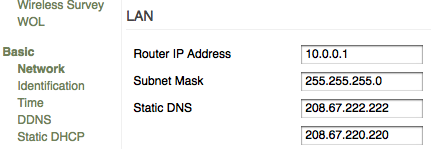
There you have it – DNS that still resolves local systems, but is significantly more reliable than the ISP-provided service.
Update – October 2/09: Rogers has their own alternate DNS server that you can use – I noticed an issue with OpenDNS resolving some URLs today so I switched to this one.
altdns.rnc.net.cable.rogers.com
64.71.255.202
Comments are closed.